✓ $19.99 · One-time payment · Free updates for life
CC Cleaner

Free up space on your Mac.
Safely.

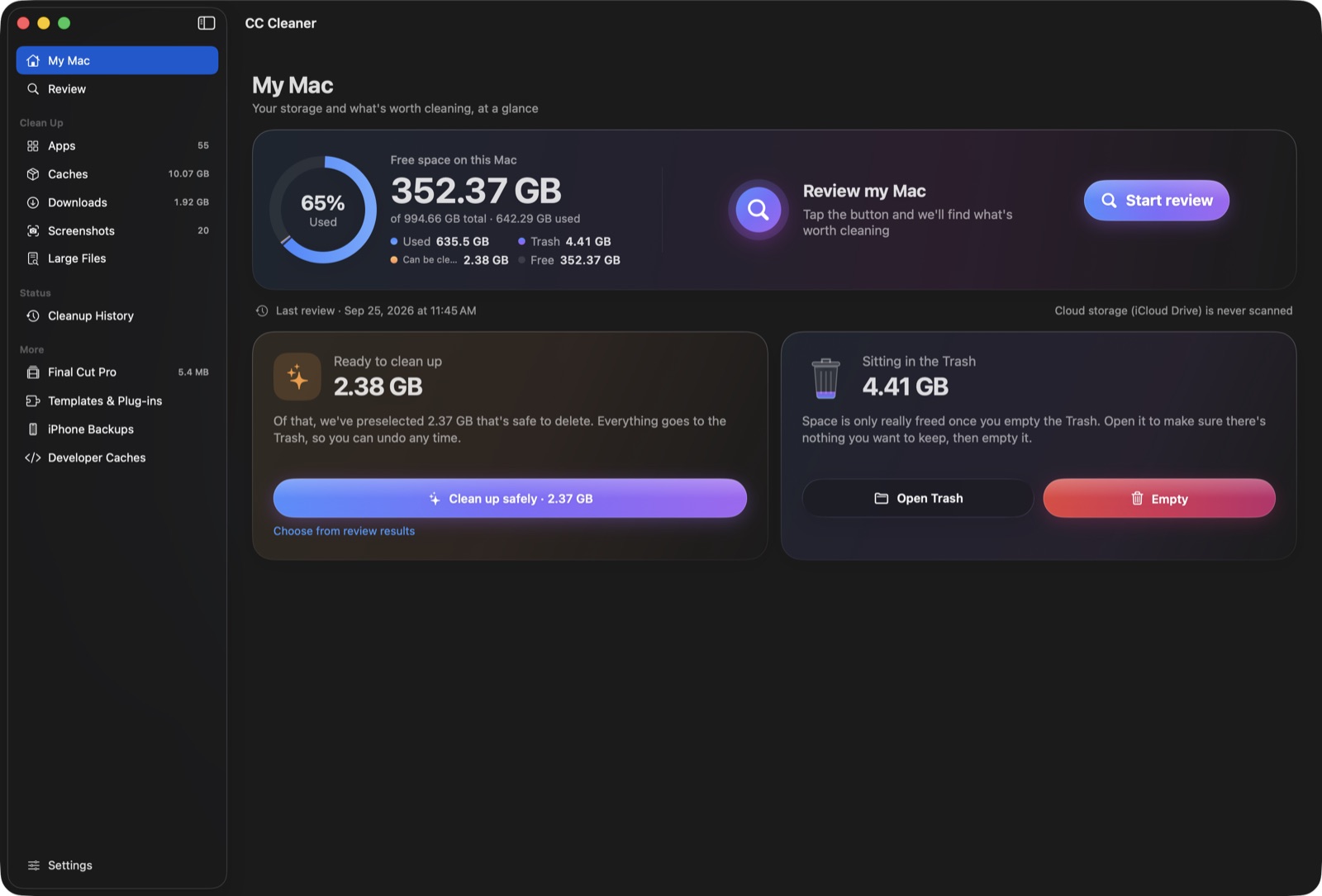
Press one button and CC Cleaner finds caches, leftovers from apps you deleted, and files you downloaded twice. It picks only what's safe and moves it to the Trash, so you can undo until you empty the Trash.

Download free Buy · $19.99

✓ One-time payment · Free updates for life · Not a subscription

Mac with Apple silicon (M1 or later) · macOS 26 or later · Clean up to 2 GB for free · No account needed

CC Cleaner home screen showing free space and what can be cleaned

More precise than a sweep.
Cheaper than a subscription.

Cleaning up shouldn't mean guessing what to delete — or paying every year. CC Cleaner checks every item for you, and you pay only once.

🎯

Precise

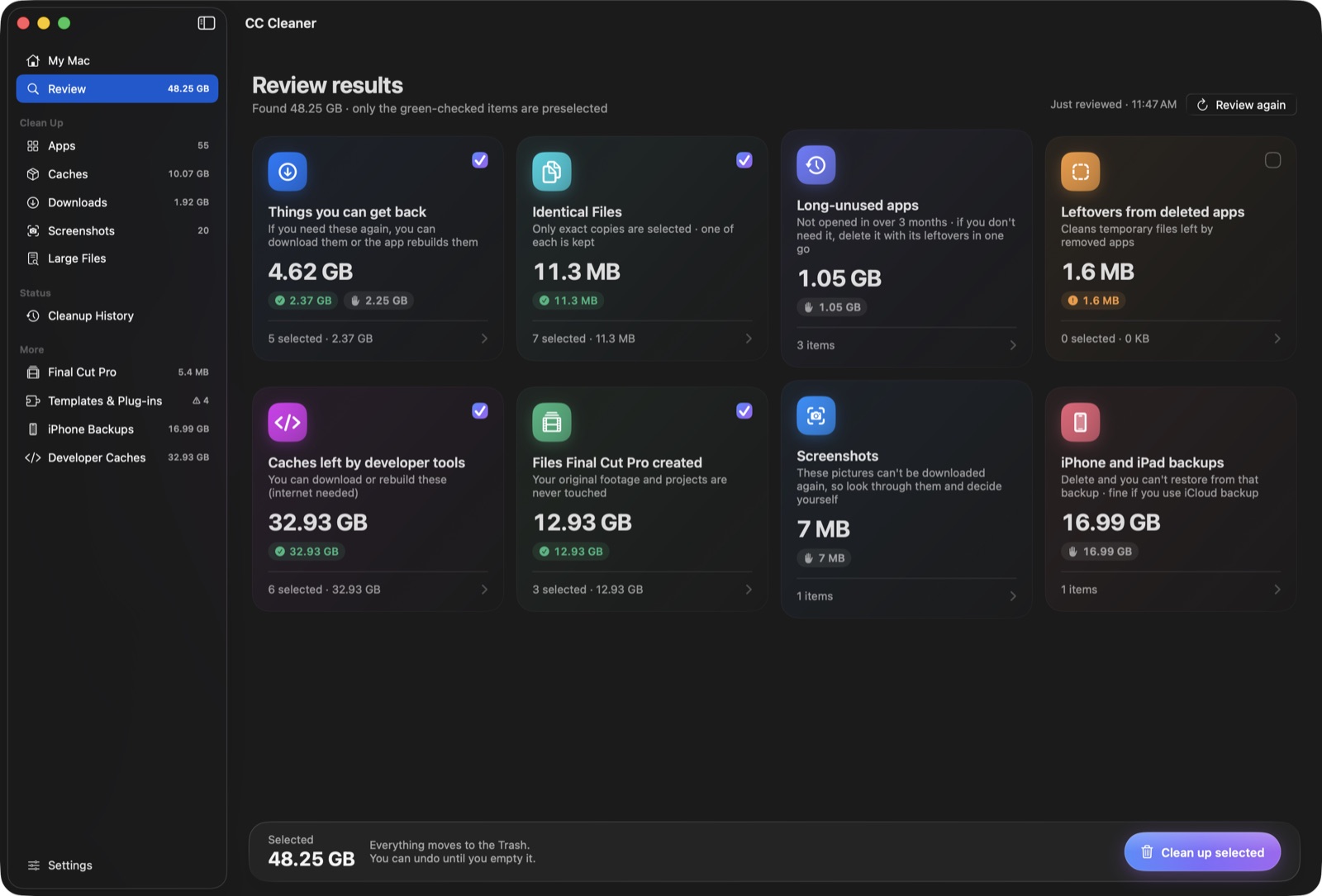
Every item is checked one by one and labeled Safe to delete, Check first or Don't delete. Only the safe ones are preselected.

🛡️

Safe

Nothing is erased right away. Everything goes to the Trash, and you can undo it with one click from the cleanup history.

💰

Affordable

$19.99 once — less than what popular cleaners charge for a single year. Lifetime use and free updates included.

Three steps. About one minute.

No settings to learn. No technical words to understand.

  1. 1

    Press Start review

    CC Cleaner looks through your Mac in about a minute. You can keep working while it runs.

  2. 2

    See what's safe

    Results are grouped into simple cards. Items with a green check are safe and already selected for you.

  3. 3

    Clean up

    Press Clean up. Everything moves to the Trash, so you can bring it back until you empty it.

CC Cleaner review results grouped into cards

What CC Cleaner finds

The places that quietly fill up your Mac — checked for you in one review.

📦

App caches and logs

Temporary files apps pile up. Apps rebuild them when they need them. Caches of apps that are running right now are skipped.

⬇️

Installers in Downloads

Installer files for apps you've already installed, and zip files you've already opened.

🧩

Leftovers from deleted apps

Settings and support files left behind after you dragged an app to the Trash.

📑

Identical files

Exact copies in Downloads and on the Desktop. One copy is always kept.

🗂️

Apps you no longer use

Apps you haven't opened in 6 months or more. Remove an app together with its leftovers in one go. What you made in the app, like chats and saved files, stays unless you choose it.

🐘

Large files

Your biggest files, sorted by size, so you can decide what to keep. Nothing here is selected for you.

📸

Screenshots

Screenshots piling up on your Desktop, shown as pictures so you can pick easily.

💿

Old installers and system leftovers

Old macOS installers, iPhone and iPad update files, and Time Machine temporary backups.

📱

iPhone and iPad backups

Old device backups that can take tens of gigabytes. Shown clearly so you can decide.

🎬

Final Cut Pro files

Render and proxy files Final Cut Pro can make again. Your original footage and projects are never touched.

🛠️

Developer caches

Files left by Xcode, Homebrew, npm and other developer tools. They can be downloaded or rebuilt.

🗑️

The Trash

See how much the Trash is holding, open it to check, then empty it when you're ready.

Precise by design

Instead of sweeping whole folders, CC Cleaner checks every single item before it is selected.

✓ Safe to delete! Check first✕ Don't delete

Every item gets a label

Safe to delete, Check first or Don't delete. Only Safe to delete is selected automatically — the rest is your call.

Leftovers are matched to the right app

Leftovers are found by the deleted app's ID, not by guessing from names. If another app from the same developer is still installed, their shared files are left alone.

Duplicates are compared by content

Two files are called identical only when their contents match exactly, byte for byte — not just their names or sizes.

Checked again right before cleaning

Just before moving anything, CC Cleaner checks once more that the item is still there and still safe to move.

A final safety guard

macOS system folders, files other apps need, your Mail, Messages and Photos libraries, and iCloud Drive are always protected — even if something else goes wrong.

Everything is recorded

The Cleanup History shows what was cleaned, when, and how much. Undo any cleanup with one click until you empty the Trash.

Pay once. Save for years.

Popular Mac cleaners are sold as yearly subscriptions. CC Cleaner is not.

CC CleanerTypical subscription cleaner
Price$19.99 onceAbout $40–$50 every year
Cost over 5 years$19.99$200 or more
UpdatesFree for lifeOnly while you keep paying
Macs includedUp to 31 on basic plans
Free trialClean up to 2 GB, no time limitVaries

Based on the public list prices of popular Mac cleaner subscriptions for one Mac, as of September 2026. Prices may change.

One payment. Yours for life.

Not a subscription. Try it free first, then decide.

Free

$0
 
  • Unlimited reviews
  • Clean up to 2 GB
  • Everything goes to the Trash, with undo
Download free

Full version

$19.99
One-time payment · Free updates for life
  • Lifetime use with one payment
  • Free updates for life
  • Clean without limits
  • Up to 3 Macs
  • Not a subscription
Buy · $19.99

Payments are handled securely by Lemon Squeezy. Your license key arrives by email. All sales are final — refund policy

🔒

Your files stay on your Mac

Scanning and cleaning happen entirely on your Mac. CC Cleaner never uploads your files or file names. The internet is used only to check for updates, verify your license and show the current price.

Questions

Is it really safe?

Yes. CC Cleaner never touches macOS, files other apps need, your Mail, Messages or Photos libraries, or iCloud Drive. Everything goes to the Trash, and you can undo from the Cleanup History until you empty it. The only exception is Time Machine temporary backups: macOS removes those directly, and only after you confirm in a separate window.

Are my files sent anywhere?

No. Scanning and cleaning happen entirely on your Mac. The internet is used only to check for updates, verify your license and show the current price.

Why does it ask for Full Disk Access?

macOS protects the Trash and app data folders, so this permission lets CC Cleaner look inside them. Basic cleaning works without it, and the app shows you how to turn it on step by step.

Is it a subscription?

No. Pay $19.99 once and use it for life, including all future updates.

Can I use it on more than one Mac?

Yes, on up to 3 Macs with one license. If you get a new Mac, choose Deactivate on This Mac in Settings on the old one, then enter the key on the new one. If the old Mac no longer works, email us and we'll free up its place.

What can I do with the free version?

Everything except cleaning more than 2 GB. Reviews are unlimited, so you can see exactly what CC Cleaner finds on your Mac before you buy. Items you move to the Trash count toward the 2 GB, even if you put them back later.

What happens after I buy?

Your license key arrives by email right away. Open CC Cleaner, go to Settings › Purchase · License › Enter License, and paste the key. That's it.

When is the space actually freed?

Cleaned items move to the Trash first, so you can change your mind. The space is freed when you empty the Trash — CC Cleaner shows you how much is in it.

Can I get a refund?

Because you can try it for free (up to 2 GB) before buying, all sales are final. See the refund policy for details.

Which Macs are supported?

Macs with Apple silicon (M1 or later) running macOS 26 or later. Intel-based Macs are not supported. CC Cleaner is available in 30 languages and updates itself automatically.

See what you can free up — for free.

Download CC Cleaner and press Start review. It takes about a minute.

✓ One-time payment · Free updates for life · Not a subscription